Let me set the scene. It’s 3 a.m., you’re the first engine arriving at a working house fire, and the radio is already crackling with incoming units. You have about thirty seconds to size up the building, declare command, assign your crews, establish water supply, and start thinking three moves ahead; all while speaking in calm, clipped radio transmissions that your whole team is counting on.
Now imagine practicing that. Not with a textbook. Not with a tabletop exercise where someone slides cardboard trucks around a map or doodles on a whiteboard. Actually practicing it: voice, radio, pressure, unpredictability all from your laptop or mobile device; anywhere and anytime.
That’s what I wanted to build in anticipation of the promotional process my department puts on. And look, nothing beats command simulation training with a fire station full of guys who each have a radio and being able to practice with real humans. I know that. This tool wasn’t built to replace that, but rather to supplement it.
Background
I’ve been a career firefighter with the Virginia Beach Fire Department for years. I’ve also been deep in the AI world — teaching clients how to use tools like Google Gemini, Notebook LM, Claude Code, Chat GPT, building automated workflows, and running an AI consulting company called Ask Lucy. For a while, those two parts of my life stayed in their own lanes. But then I thought, “How could I use AI to help me get promoted?” I leaned heavily on AI for studying for the written test, but I still didn’t have a plan for how to train for the tactical.
The problem I keep seeing in the fire service is that incident command training is hard to replicate. You can read the National Incident Management System front to back. You can memorize your department’s SOPs. But the actual skill — radio communication under pressure, managing multiple units, making decisions when things go sideways — that only comes from reps. And reps are hard to get when every training evolution requires bodies, radios, mutually agreed on times, and a lot of coordination.
What firefighters preparing for promotion desperately need is reps. Actual repetitions on the radio, making decisions, pressure simulation and practice updating command boards. I wanted to build something that gave me that.
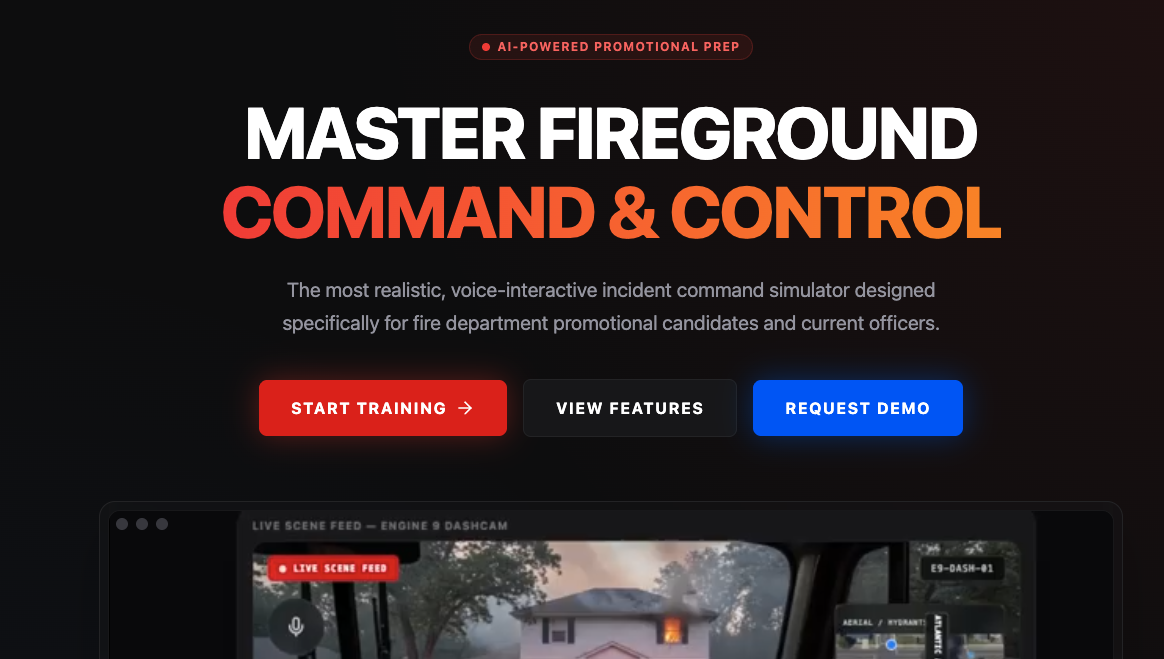
So I built Fire Ground Sim. It’s a voice-based AI training tool that puts the firefighter in the command seat of a fictitious emergency. The user plays the first-arriving unit. The AI plays everyone else: every responding engine, ladder, and rescue company, the dispatch center, and eventually the battalion chief who arrives to take command.
The simulation runs five to seven minutes of real-time radio traffic. Units arrive on scene, await assignments, report progress, and — here’s the part that makes it actually useful — throw curveballs. Water supply failure. A victim found. A Mayday. Structural compromise. The user doesn’t know what’s coming. That unpredictability is the whole point.
Here is a short demo of how the tool works. Please note, there have been MANY updates since this video was recorded:
Customization
Unit Type and Quantity
The customization piece is worth a moment. Some departments run Engine 9 and Battalion 7. Some don’t. The app lets you configure your own unit designations, dispatch name (Virginia Beach, Norfolk, San Francisco) and chief officer callsigns. The simulation speaks your department’s language — not mine. The users selects what type of structure they want to respond to: Single Family, Multi Family, Commercial, High Rise, or Vehicle Entrapments. The user can also select the number of engines, ladders, rescues, etc and their call sign to match their local run cards.
Command Board
The app also features a command board that displays the units assigned to the call type the user chose. The command board can be re-sized and moved around the screen as necessary. The user can physically type in the assignments they give to each unit to help reinforce command board tracking.
Modes
The app displays a series of mode to remind the user to communicate that information to the responding BC. There are also (3) manual injections the user can click on which will prompt a radio transmission- Mayday, Chief Arrival and Flashover.
- offensive
- defensive
- investigative
- transitional
- rescue
The First 2 Minutes of Deployment
The user is greeted with an emergency scene and has to transmit a size up. After the size up, the user transmits the 360 report and clicks “start timer”. Once the timer is started, the simulation actually starts: units begin arriving, reporting benchmarks, providing operational texture and occasionally transmitting curveballs.
Scene Size Ups
A quick note on size ups. The app will also allow the user to practice scene size ups. Upon clicking “scene size ups” the user will be shown a realistic picture of an emergency scene every 30 seconds. They use the spacebar to transmit the scene size up before the next image populates.
What I can tell you is that the bones are solid and the core mechanic works. The AI responds correctly to commands, it stays in character, and it produces realistic radio traffic that genuinely requires you to think. The spontaneous event injection, the thing that makes it feel like a real fireground, gets sharper with every iteration.
This is what building with AI actually looks like in 2026. It’s not a polished product on day one. It’s a conversation that gets smarter the more you push it.
Wrap up
I’m sharing this here for a few reasons. One, because this is what Ask Lucy is about — not AI as a buzzword, but AI as a tool that solves a real problem for a real person. Two, because I think there are a lot of people in specialized fields who have the same thought I had: “Someone should build that.” Maybe that someone is you. And three, honestly — I’m proud of it, and I wanted to tell somebody.
The app is live at firegroundsim.com. If you’re in the fire service, know someone who is, or are just curious what AI-powered simulation looks like when it’s built by someone who actually does the job — go take a look and request a demo if you’d like to give it a test spin.
And if something breaks, well. That’s what beta means.