
Building the equipment checks application
There are a lot of ways to lose good information in the fire service. Some of them are dramatic. Most of them are not.
Most of the time, it is a small failure in the system. A check gets done but never becomes searchable. A problem gets found but has to be re-explained three times. A passdown note lives in one place, a work order lives somewhere else, and the officer trying to make sense of it all ends up doing detective work before coffee.
That is the kind of problem we built the equipment checks application to solve.
The goal was not to make another shiny app that looks good in a meeting and then dies quietly on the station computer. The goal was simpler: make it fast for firefighters to document the checks they already do, make it easy for officers to see what was completed, and make equipment problems visible before they become a bigger problem at a worse time.
In other words, the app had to respect the way the job actually works.
Why we built it
Equipment checks are one of those routine things that only feel routine until something is missing, broken, dead, empty, expired, leaking, or mysteriously “working fine yesterday.”
Departments already had the need:
- Daily apparatus checks
- Weekly apparatus preventive maintenance
- LifePak checks
- CO monitor checks
- SCBA checks
- Passdown notes between shifts
- Officer audit logs
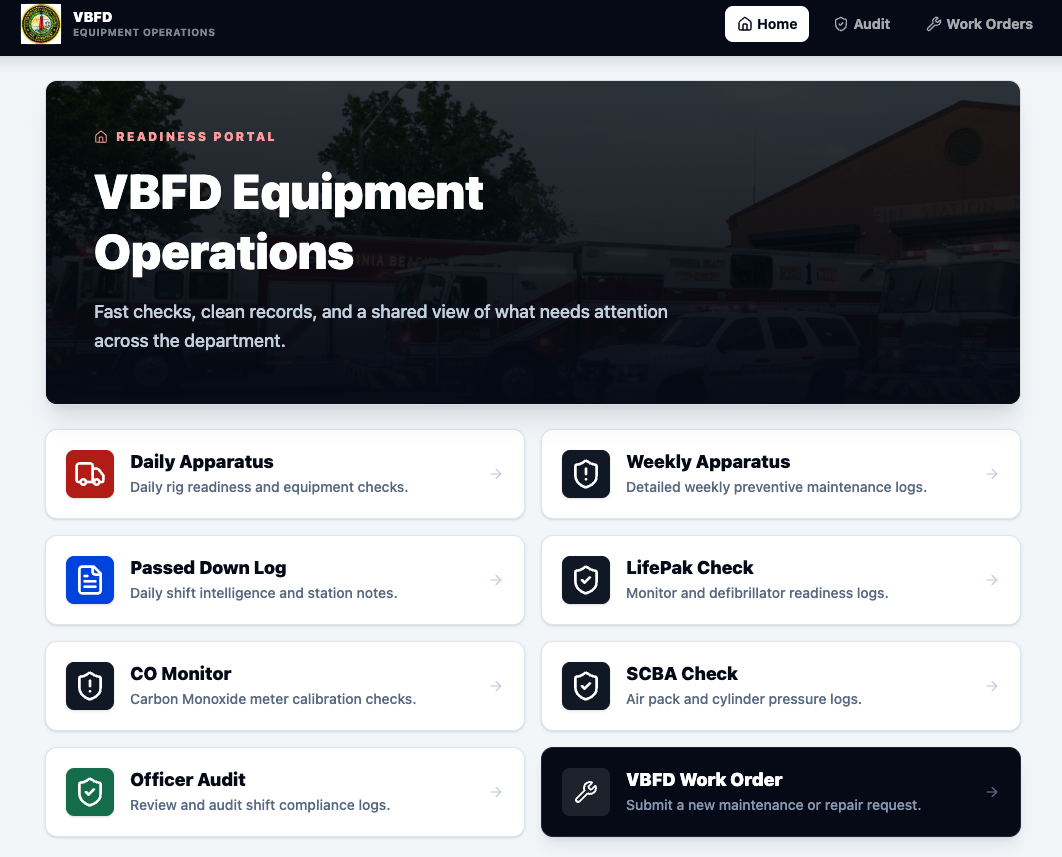
- Work orders for vehicle, equipment, and station issues
The problem was not that people were unwilling to do the work. The problem was that the information needed a better path. Paper can work. Spreadsheets can work. Emails can work. Whiteboards can work, right up until someone takes a picture of the wrong one, or the person who knows the context is off for four days, or the note gets buried under twelve other notes and a suspicious coffee stain.
We needed a system that could capture the check at the station level and still create clean data on the back end. That was the design targe
The daily apparatus check is the center of gravity
The daily apparatus check was the first thing we wanted to get right because it is the workflow crews touch the most. The form starts with the basics: station, shift, unit, bumper number, mileage, and the person submitting the check. When a unit is selected, the app can match it to the bumper number, which reduces typing and cuts down on bad data.
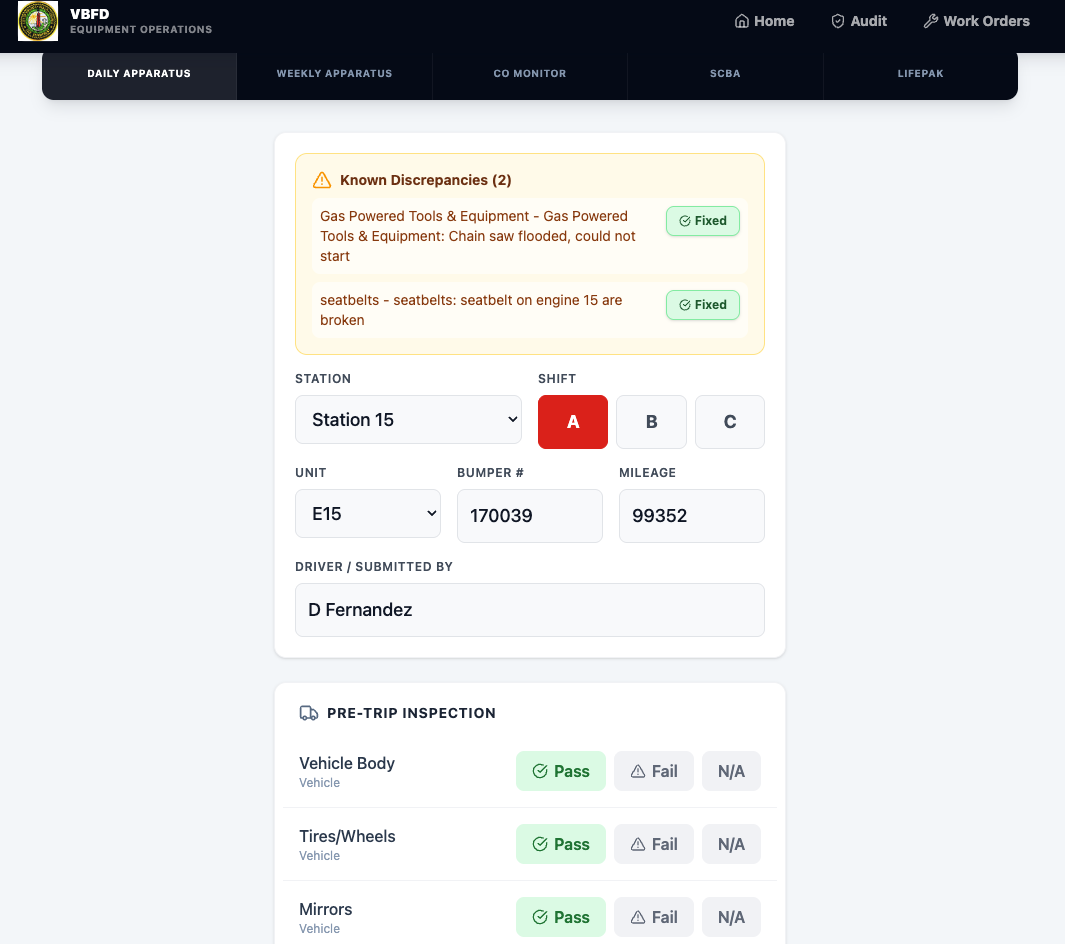
Each item can be marked Pass, Fail, or N/A.
That sounds basic, but basic is the point. If a firefighter has to fight the form, the form loses. The UI needed to be clear enough to use between calls, on a station device, without someone needing a training packet the size of a phone book.
When something fails, the app asks for notes. Those notes matter because a failed check without context is just another future argument. “Tires failed” is not nearly as useful as “right rear inside tire low, refilled, monitor next shift.”
The app also keeps track of known issues. If a problem is still open, it can surface again instead of relying on somebody’s memory. When it gets fixed, it can be marked fixed. That closes the loop.
That is the difference between collecting forms and running a system.
Officer audit logs give supervisors a real view
Once the checks are submitted, officers need a way to audit them without digging through individual entries like they are searching for evidence in a cold case. The Officer Audit Logs screen gives them that view.
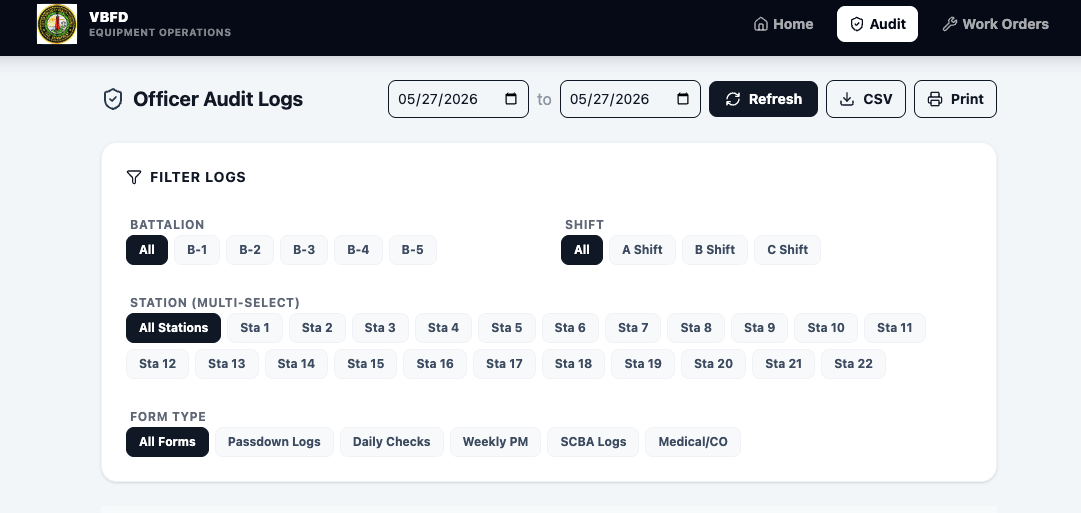
The audit dashboard can filter by:
- Date range
- Battalion
- Station
- Shift
- Form type
It also separates the major categories, including passdown logs, daily checks, weekly PM, SCBA logs, and medical or CO-related checks. This matters because supervision is not just “did someone click submit?” It is pattern recognition.
Are checks missing from one station? Is a certain shift consistently catching the same issue? Are we seeing repeated failures on the same unit? Did the passdown note explain why a work order was submitted?
Those questions are hard when the data is scattered. They become much easier when the system stores each submission in a consistent format and gives officers a way to filter the records.
The app also supports CSV export and printing, because sometimes the right answer is still, “send me the report.” We can pretend every process is fully digital, but eventually someone is going to ask for a file, a printout, or a number they can take into a meeting.
So we built for that too.
Work orders connect the problem to the next action
Finding a discrepancy is only half the job. The next question is: what happens to it?
The work order section gives crews a clean path for vehicle, equipment, and building issues.
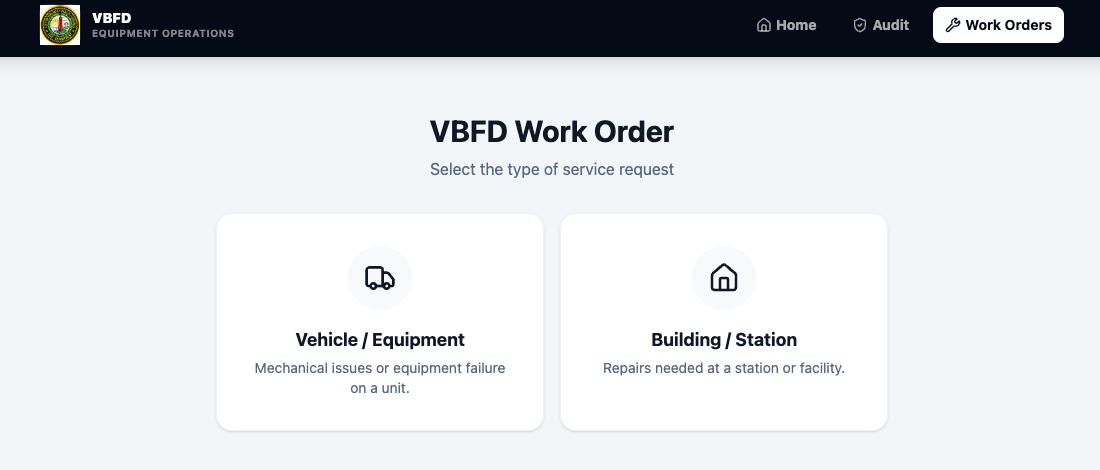
For vehicle and equipment issues, the app starts with the unit and bumper number. It also captures current mileage, PM mileage, PM date, state inspection date, shift, problem descriptions, and the submitter.
The important part is that the work order workflow can check for open discrepancies on that unit. If an issue was already found during an apparatus check, the person submitting the work order can see it and add it to the description.
That keeps the operational story together:
- The crew finds the issue during the check.
- The issue becomes part of the equipment record.
- The work order can reference the same problem.
- Officers can later audit whether the issue was documented and acted on.
Behind the scenes, the Google Apps Script can create a work order document in Google Drive, generate a PDF, and log the request. Email can be turned on later when the Drive workflow is verified.
That last part is intentional. We did not need to overbuild the notification layer on day one. We needed the record to be right first.
Passdown logs stop shift information from disappearing
Passdown information is one of the most valuable and fragile parts of station life.
It is where the small operational details live: equipment issues, station maintenance, outstanding tasks, personnel notes, strange building problems, and all the other things that are too important to forget but too ordinary to become an incident report.
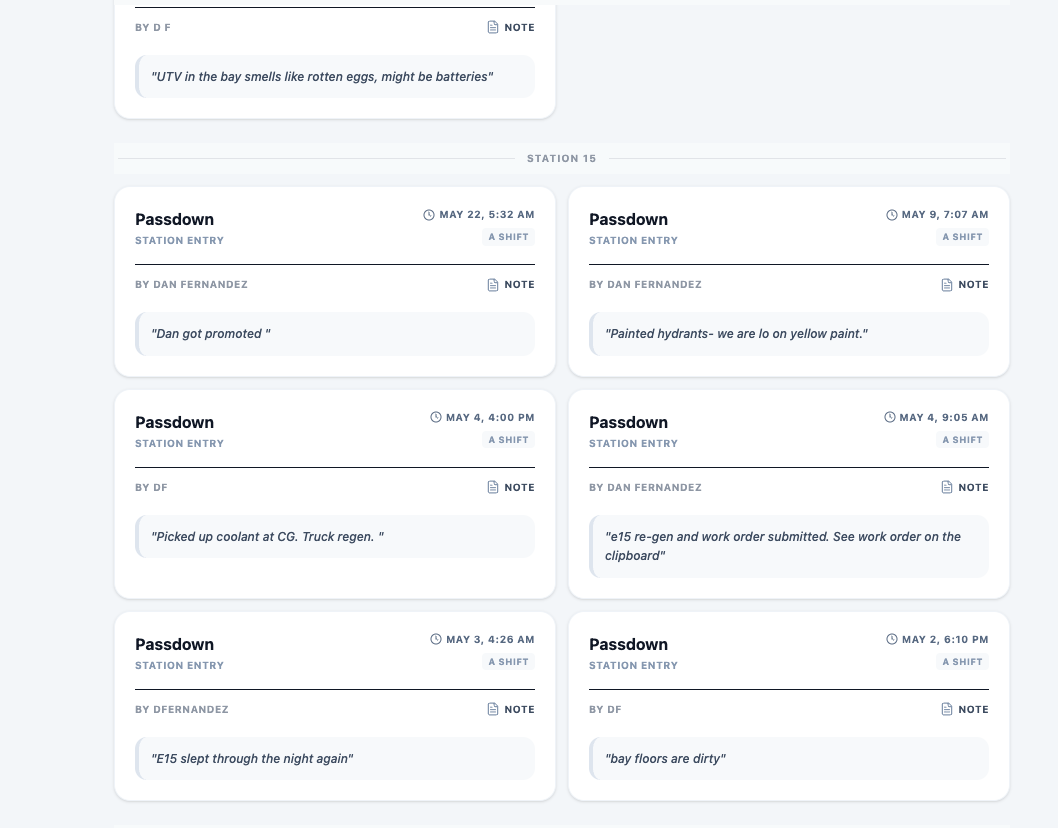
The passdown log captures:
- Date
- Station
- Shift
- Submitted by
- Daily passdown notes
The form is intentionally simple. A passdown note does not need twenty fields. It needs to be easy to write and easy to find later.
Once submitted, that information goes into the same reporting structure as the rest of the app. That means officers can pull it into the audit view and compare it with checks, work orders, and other station activity.
That is where the value shows up. A note that says “bay doors acting up again, work order submitted” should not live in isolation. It should be part of the same operational picture as the work order and the station’s daily activity.
How the data is organized
The front end is a React and Vite application. The back end is a Google Apps Script web app connected to Google Sheets and Google Drive.
That setup was a practical choice.
We did not need a custom database server just to prove the workflow. Google Workspace already gives us identity, Sheets, Drive, Docs, and sharing controls. For a department workflow like this, it means the data can live somewhere familiar while the app gives crews a better front door.
Each submitted form is normalized before it is sent to Google Apps Script. The script writes the data into three main Sheets tabs:
- Master_Log: one row per submitted form
- Checklist_Items: one row per checklist item
- Open_Discrepancies: current failed items that still need attention
The work order flow also logs to a Work_Orders tab and can create Drive documents and PDFs.
That structure gives us three different kinds of value:
The first is recordkeeping. We know what was submitted, when it was submitted, who submitted it, what asset it involved, and whether anything failed.
The second is searchability. A chief, battalion officer, station officer, or analyst can filter the logs to ask targeted questions (e.g., Show open SCBA issues, Show failed apparatus items last week, or Pull passdown notes for a shift).
The third is instant, AI-driven context. Because this entire setup lives natively on our Google Drive, departments using Gemini in Google Workspace get an immediate superpower. You don’t have to be a spreadsheet wizard or wait for a custom dashboard to get answers. You can simply go to the Google Drive folder where this daily data sheet lives, open Gemini, and ask any question you want in plain English. Gemini will parse the context across the entire department’s history and give you the answer right at your fingertips.
That is the reason the data model matters. The app is not just storing a blob of form text. It is turning routine station work into records that can be filtered, audited, conversational, and acted on.
What we learned
The biggest lesson is that fire service software has to be built around friction.
Not theoretical friction. Real friction.
Cold hands. Bad Wi-Fi. Someone getting toned out halfway through the form. A station computer that has seen things. A crew that does not have time for six extra clicks because a developer wanted the workflow to feel fancy.
The app had to be direct:
- Big targets
- Clear status buttons
- Short forms where possible
- Structured data where it matters
- Officer views that answer real supervision questions
- Work orders that connect documentation to action
- Passdown notes that can actually be found again
We also learned that the back end matters just as much as the front end. A good-looking form that produces messy data is just a prettier version of the old problem.
The real win is the connection between the form, the audit trail, the discrepancy tracking, the work order, and the passdown log.
That is the system.
Where it goes next
The current version gives us a working foundation: daily checks, PM checks, medical equipment checks, SCBA checks, passdown logs, officer audits, and work orders.
The next steps are the practical ones:
- Keep testing the workflow with real station use
- Tighten the work order document process
- Improve how open discrepancies are displayed across forms
- Add better reporting views once enough data exists
- Make sure the system stays fast on station devices
Plan for enterprise scaling. It is important to note that while Google Sheets is a great starting point, it has an inherent limit on the volume of data it can capture (typically topping out around 10 to 15 million cells). If this system is adopted by a large metro department and utilized as their primary source for department-wide information gathering, we recommend upgrading the backend database from a Google Sheet to a platform like Firebase that can scale seamlessly to handle infinite amounts of data.
I am sure we will find things that need to change. That is normal. Honestly, if the first version of a firehouse workflow survives contact with real firefighters without needing changes, someone probably did not test it hard enough.
But the foundation is right.
The app takes work that was already happening, gives it a cleaner path, and turns it into information the department can actually use.
That is the point.